# Building a Github Repo Template Part 5: Next.js Environment Variables
In this ongoing series, I am putting together a [Github Repository Template](https://github.com/blainegarrett/react-next-material-typescript-template) for my "Go To" front-end tech stack of Next.js, React, TypeScript etc. In this installment of the series, I will get custom environment variables into our Next.js application using .env files. I will also explore how Next.js handles runtime vs build time environment variables.
**Just want the Code?** [View the full changeset covered in this post](https://github.com/blainegarrett/react-next-material-typescript-template/compare/0.0.4...0.0.5) or check out the [0.0.5 release of the repository](https://github.com/blainegarrett/react-next-material-typescript-template/releases/tag/0.0.5).
## Next.js Environment Variables Background
One of the powerful things about Next.js is that it renders your React components on the server as well as in the browser. This allows you to leverage the servers' processing power and caching to serve up the React content (mostly) the same as if it was rendered only in the browser. Server Rendering also helps with SEO and a host of other things. ([See this helpful graphic about the tradeoffs and benefits of server rendering with respect to rendering time](https://twitter.com/_developit/status/1093223382223605762)).
Additionally, certain backend code can also isolated to *only* the server - [getServerProps](https://nextjs.org/docs/basic-features/data-fetching#getserversideprops-server-side-rendering), [Api Routes](https://nextjs.org/docs/api-routes/introduction), etc. This allows us, to for example, query a database. However, we wouldn't want to expose our database credentials to the browser client. That would be bad. Very bad. The only way to accomplish this was with Next.js was utilizing [Runtime Configuration](https://nextjs.org/docs/api-reference/next.config.js/runtime-configuration) to inject environment variables into your app. However, with the release of [Next 9.4](https://nextjs.org/blog/next-9-4), we have a far easier and more universal approach leveraging .env files. In this post, I'll explore the new environment variables support and add some very basic environment variables to my Github Repository Template.
## Introducing .env files
First, I'll create a new file in the project root named `.env` and add the following content:
```
# Base Environment Variables
NEXT_PUBLIC_THEME_BACKGROUND="#f6f7f9"
NEXT_PUBLIC_THEME_FONT_COLOR="rgba(0, 0, 0, 0.87)"
NEXT_PUBLIC_THEME_GREETING_EMOJI="🔥"
MY_SECRET="This is top secret"
```
Restarting the app via `npm run dev` I see that Next.js loads the file (without having to install any other packages - thanks Next.js!):

These variables are now available on `process.env` inside the Next.js application. Only variables that start with `NEXT_PUBLIC` will be available on the browser client. All variables will be available on server code.
## Consuming Public Environment Variables
To illustrate consuming public environment variables, I'm going to introduce some basic styling to the application. In the next part of the series, I'll leverage these variables for Material-UI themes.
Start by creating a file in the */pages* directory called *_document.tsx* with the following content:
```
// /pages/_document.tsx
import React from 'react';
import Document, {
Head, Main, NextScript,
} from 'next/document';
class MyDocument extends Document {
render(): JSX.Element {
return (
);
}
}
export default MyDocument;
```
Next.js allows you to override the base html template using the *_document.tsx* file ([learn more](https://nextjs.org/docs/advanced-features/custom-document)). For the purpose of this tutorial, I'm just going to add a style tag to leverage the environment variables. Restart the application with `npm run dev` I see the following (note the background and font color change):

Now, technically, the _document.tsx is only rendered on the server, so I'll update `src/screens/IndexContent.tsx` to control the emoji to ensure the variable is read on the client as well.
```
import React from 'react';
interface IndexProps { greeting: string }
const IndexContent: React.FC = (props) => {
const { greeting } = props;
return (
{greeting}
{process.env.NEXT_PUBLIC_THEME_GREETING_EMOJI}
!
);
};
export default IndexContent;
```
Reload the page, I see the following (note the 🔥 emoji vs the 👋):

I have now illustrated that environment variables starting with *NEXT_PUBLIC* are available on the server *and* the client.
## Using .env.local for Default Environment Variables
One feature of .env files I liked about Create React App is that you could actually have a hierarchy of .env files. The actual *.env* file could provide an exhaustive set of defaulted environment variables. Then a *.env.local* file could be used to provide values specific to the environment. This is a great way to support [12 Factor applications](https://12factor.net/config). In production environments, I can simply include an environment specific *.env.local* that could, for example, contain the production database credentials, etc. Next.js supports this as well!
To illustrate this hierarchy, I will create a *.env.local* file in the project root with the following content.
```
# Local Environment Variables
NEXT_PUBLIC_THEME_GREETING_EMOJI="🍊"
MY_SECRET="Extra Super Secret"
```
Now, restarting the server via `npm run dev` I see:

Note: The `process.env.NEXT_PUBLIC_THEME_GREETING_EMOJI` variable took on the overridden value from within *.env.local* and that the other public THEME variables retained their value from the *.env* defaults. Neat!
**Note:** This hierarchy optionally goes further with *.env.development* and *.env.production* (corresponding to if you start the app with `next dev` or `next start` respectively - thanks @[Chris Weekly](@chrisweekly) for the correction). I do not utilize this much so I won't include it in my Github Repo Template, but you can read more about it [here](https://nextjs.org/docs/basic-features/environment-variables#default-environment-variables).
**Note:** You should never commit passwords, API keys, and other secrets into Github. If you adopt this default approach, ensure that your `.env.local` file is added to your *.gitignore* file. If you use the *.env* file for defaults and do not include any secrets, you can check that in to source code. Just be sure to remove it from *.gitignore* if it is present.
## Server Only Environment Variables
Next, I want to confirm that environment variables that do not start with *NEXT_PUBLIC* are only available on the server.
To illustrate this, I'll add some logging and leverage Next.js's *getServerSideProps* in */pages/index.tsx*. Note: We cannot use *getServerSideProps* AND *getStaticProps* in the same page component, so I have removed the later.
```
import React from 'react';
import {
NextPage,
GetServerSidePropsContext, GetServerSidePropsResult,
} from 'next';
import IndexContent from '~/screens/IndexContent';
interface IndexProps { greeting: string }
const IndexPage:NextPage = (props: IndexProps) => {
const { greeting } = props;
console.log(`Inside IndexPage Render component. Browser: ${!!process.browser}`);
console.log(process.env.MY_SECRET);
console.log(process.env.NEXT_PUBLIC_THEME_GREETING_EMOJI);
return (
);
};
export async function getServerSideProps(context: GetServerSidePropsContext):
Promise> {
console.log(`Inside getServerSideProps. Browser: ${!!process.browser}`);
console.log(process.env.MY_SECRET);
console.log(process.env.NEXT_PUBLIC_THEME_GREETING_EMOJI);
return {
props: { greeting: 'Hello From The Server' }, // will be passed to the page component as props
};
}
export default IndexPage;
```
The above will log out MY_SECRET and NEXT_PUBLIC_THEME_GREETING_EMOJI as well as tell me if we're running in the browser or server.
Reloading this page, the server outputs:
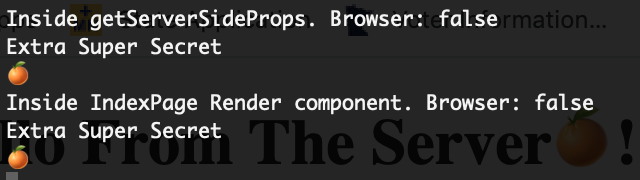
Whereas the client outputs:

As we can see, *MY_SECRET* is available to the IndexPage component when the page is rendered on the server, but not when rendered on the client. Also, note that *MY_SECRET* is available inside of *getServerSideProps* which is never run on the client.
## Avoid Potential Leaking of Secrets ⚠️⚠️
As we saw in the previous example, *MY_SECRET* is technically available inside of the *IndexPage* component when rendered on the server. However, you should not attempt to directly use it in your component for rendering purposes. Since *MY_SECRET* will not be available on the client when it renders, React will trigger a *Content did not match* error because the client and the server will render different output. Also, through this error, you may leak your secrets meant only for the server.
To illustrate this error case, I can pass *process.env.MY_SECRET* as the value of the *greeting prop* of IndexContent.
```
// /pages/index.tsx
...
return (
);
...
```
In the browser, this will produce:

Additionally, I get the content mismatch error between the client and the server.
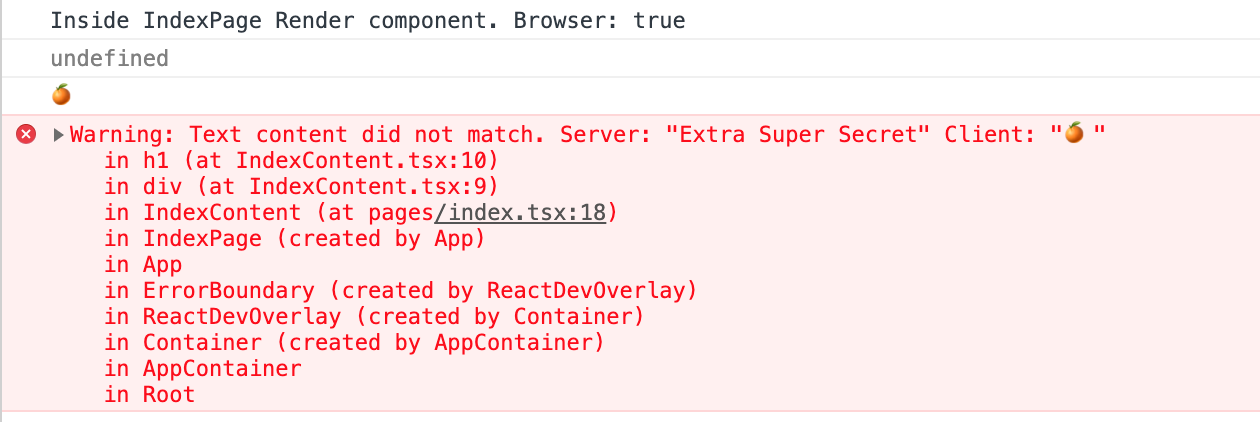
Note: That the value of *MY_SECRET* is exposed because it is part of the server output. Thus anyone viewing the page can look at the server rendered response and see our secret. Do not do this. If an environment variable does not start with *NEXT_PUBLIC*, only use it in server specific contexts like getServerProps, apiRoutes, etc.
## Runtime vs. Build Time Evaluation
For extra confidence, if I do a production build of the application, I want to check the bundles for the values of the environment variables.
```
rm -rf .next && npm run build
```
Notice the console message that *.env* and *.env.local* are being read *at build time*. This is potentially worrisome.
Now I'll search the production build bundles for the values of private and public environment variables:
Searching for the value of *MY_SECRET*:
```
grep -rn "Extra Super Secret" .next/
```
This yields nothing, whereas searching for the value of *NEXT_PUBLIC_THEME_GREETING_EMOJI*
```
grep -rn "🍊" .next/
.next//server/static/1gu-CLKzeq3pp_TQegMjc/pages/index.js:126: return __jsx("div", null, __jsx("h1", null, greeting, "🍊", "!"));
.next//server/static/1gu-CLKzeq3pp_TQegMjc/pages/index.js:141: console.log("🍊");
.next//server/static/1gu-CLKzeq3pp_TQegMjc/pages/index.js:150: console.log("🍊");
```
As we can see, our secret environment variable is *not* exposed in the build bundle, whereas our public one is completely *replaced*, even on the server. This means, public environment variables are interpolated at **buildtime** and private environment variables are read at **runtime**. Private variables never get bundled. However, this also means that public environment variables cannot be changed without running a whole new build. This may not be ideal in certain CI/CD cases when we want to create a single build and deploy to different environments (QA, Staging, etc) with different environment variables. Let's see if we can achieve runtime interpolation of public variables similar to that of private environment variables.
## Introducing Runtime Configuration
We will leverage [Next.js Runtime](https://nextjs.org/docs/api-reference/next.config.js/runtime-configuration) configuration to achieve this.
Note: As stated before, in earlier versions of Next.js, the only way to work with Environment Variables was to leverage Runtime Configuration. This required, a separate dotenv loader dependency to work with the .env files. It worked, but was cumbersome. Now we can use it for what it was designed to do.
First, I'll create a `next.config.js` file in the project root with the following contents:
```
// /next.config.js
module.exports = {
serverRuntimeConfig: {},
publicRuntimeConfig: {
// Will be available on both server and client
greeting_emoji: process.env.NEXT_PUBLIC_THEME_GREETING_EMOJI,
},
};
```
Next I'll update the *IndexContent* component to utilize the *publicRuntimeConfig* rather than consume the environment variable directly.
```
import React from 'react';
import getConfig from 'next/config';
const { publicRuntimeConfig } = getConfig();
interface IndexProps { greeting: string }
const IndexContent: React.FC = (props) => {
const { greeting } = props;
console.log(publicRuntimeConfig); // Note: This console log
return (
{greeting}
{publicRuntimeConfig.greeting_emoji}
!
);
};
export default IndexContent;
```
As a reminder, the contents of *.env.local* are:
```
# Local Environment Variables
NEXT_PUBLIC_THEME_GREETING_EMOJI="🍊"
MY_SECRET="Extra Super Secret"
```
Next I'll do a production build via `npm run build` and search again for the values of the Environment Vars:
```
grep -rn "Extra Super Secret" .next/
```
Still nothing. Perfect.
```
grep -rn "🍊" .next/
```
We have a few comment results that still directly use the Env Var but we also have:
```
... "runtimeConfig":{"greeting_emoji":"🍊"}, ...
```
This is the runtimeConfig. As per before, the Environment Variable is interpolated at build. However, the 🍊 value here is simply the initial state.
If we run the production build, we will see:

Finally, I'll update the `.env.local` file with some new content to show that build time values are overwritten at runtime:
```
# Local Environment Variables
NEXT_PUBLIC_THEME_GREETING_EMOJI="🍍"
MY_SECRET="DEPLOY TIME SECRET"
```
Finally, without creating a new build, I simply start the production build again via `npm start`. Reloading the browser, I see:

On the backend, I see:
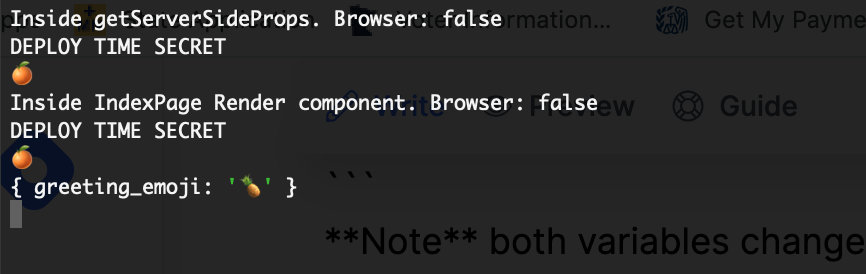
**Note:** The 🍊 is from console logging *process.env.NEXT_PUBLIC_THEME_GREETING_EMOJI* which was interpolated at build time. The 🍍, however is from console logging the *publicRuntimeConfig* which is evaluated at runtime. Also, note *MY_SECRET* has the value of "DEPLOY TIME SECRET". Try changing the values for both of these variables in *.env.local* and restart to see them change without building. It is slick.
**So, did we learn?**
- Private environment variables are not available to the browser, are not included in the bundle and *are* evaluated at runtime.
- Public environment variables are available to the browser and the server, are evaluated at buildtime, and cannot be changed at runtime.
- Leveraging Next.js runtime configuration allows public environment variables to be sent to the browser and change at run time.
## Closing Thoughts
Now that we have figured out Next.js's new approach to environment variables, we'll include this in our Github Repository Template project. [View the full changeset covered in this post](https://github.com/blainegarrett/react-next-material-typescript-template/compare/0.0.4...0.0.5) or check out the [0.0.5 release of the repository](https://github.com/blainegarrett/react-next-material-typescript-template/releases/tag/0.0.5).
[In the next part of this series](https://hashnode.blainegarrett.com/building-a-github-repo-template-part-6-material-ui-with-nexttypescript-ckcuvhqsf00dr7os1gdq2altu), I will introduce Material-UI.
## Discussion Point
What approach do you take to securely store your .env (or .env.local) files for QA and Production environments?
Image Credit: Photo by [Polina Tankilevitch](https://www.pexels.com/photo/close-up-photo-of-sliced-pineapple-4110334/) from [Pexels](https://www.pexels.com)